Let’s Create A Quilt Pattern

Have you been dreaming of a quilt idea, but you’re not sure how to bring it to life? At JUKI, we want to help you elevate your quilting skills, which comes with learning how to create your own quilt patterns and designs. So we created a base for you to start with different methods to make a pattern and applications that can assist.

Start from the Beginning

Before we can dive into creating a pattern, let’s touch base on the creative process it takes to get there. One of the best things you can do is begin a design journal, where you can jot down notes, attach scraps of fabrics, place photos, and more that will lead you to create the design you’re imagining.

Learn to upload your ideas into a digital surface. You can redraw and clean up your designs from their sketch versions here. Create a library and label it with a title like ‘New Patterns’ to keep up with your ideas. With this digital organization, you can keep a hold on pattern ideas and add touches as inspiration comes until you have a quilt design you’re ready to work with and bring to life.

If this is your first time designing a quilt, and a blank page seems daunting, lean into the power of self-imposed limitations. Create with quilt size in mind, limit yourself to fabrics already in your arsenal, hold yourself to only using 6 fat quarters. When you start off, creating limits on designs creates a constraint on specific variables, allowing those free variables to make you think outside the box and design quilts you wouldn’t have created otherwise.

Breaking Down A Quilt

Let’s begin by breaking up the layout.

Look at your design and find the repeating elements. Here is where we’ll start forming the blocks. Figuring out your blocks is usually an easy process; however, working more towards modern or complicated patterns can be more challenging. When you first start creating your patterns, start with repetition and begin building your blocks for the quilt and pattern from there.
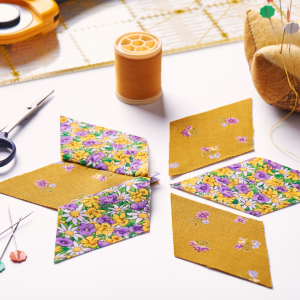
As you design your quilt, figure out the arrangement style you plan to work with. While some block designs need to be in even numbers for the quilt to come out right, other times you can create symmetric blocks that allow you to use either odd or even numbers. Remember that patterns can be built with one size in mind or edited for different size options. If you’re someone who plans to sell their patterns, customers look favorably upon having the option to choose sizes.

Once you’ve determined the design and size of your quilt, you can choose between adding borders or not. Borders are an excellent addition for multiple reasons; cleaner finish, more breathing space when creating, or as an addition to the size of your quilt pattern. Depending on your design, you can widen or tighten the border size and allow those who use your pattern the option to decide what best fits them.

Keep in mind that a quilt block size averages 6″ to 18″. You have the option to create other shapes like triangles, rectangles, and more if you want to venture away from traditional squares.

Guidelines for Pattern Creating

Now that we have a design idea, we can begin writing instructions. As you start creating the instructions and erasing and creating some more, you’ll begin to build an instruction guide that others can follow along with. Here are some things to keep in mind when writing out your pattern instructions.

  • Who is this pattern being marketed to?

Break down your pattern and think about who will be trying to follow along. New quilters will need more instructions than advanced quilters that don’t need much detail. Keep this in mind as you add instructions, tips, and illustrations to your work.

  • Instructions

Patterns don’t usually have instructions on basic techniques, like baste, quilt, and bind. Still, it usually includes instructions for advanced techniques like binding corners and adding curved piecing. To keep patterns from being overfilled with instructions, you can include links to videos and blogs that dive deeper into specific techniques.

  • Keep A Pattern Piece Library

Your first pattern creation might be complex, but once you have a few under your belt, you’ll find that it’s easy to re-use previous patterns when creating new ones. If you keep up with past projects and use them as foundations for new ones, you’ll save time, and your patterns will begin advancing.

  • Be Consistent

If you’re writing patterns to share with others, make sure to be consistent in quilting terms. When it comes time to patent your patterns if you’re choosing to sell, not having the correct terms can cause you to lose the patent. The consistent format also includes focusing on writing your measurements, quilting terminology, and your action and verb tenses. Keep in mind to label your fabric pieces, like Fabric A and Fabric B, so that the instructions are easy to follow.

Breakdown the Quilt Measurements

Now that we’ve moved on to instructions, math is the most crucial factor. Follow along as we go over a quilt example to show you an easy way to calculate your quilt squares and cutting requirements.

Step 1: Quilt block and Cutting instructions

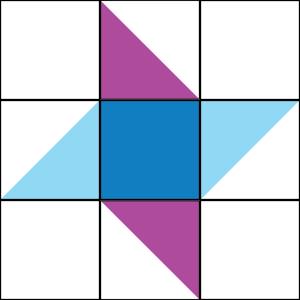
Let’s begin by breaking down the block into its individual components. Our example quilt comprises a 3 x 3 arrangement of components.

Let’s break down these pieces further! Include pieces like HST components here.

You are now at the individual fabric pieces if you’re creating a simple quilt like we’re showing here. However, if your designs are more complex and have more components, keep breaking it down until you’ve hit every piece you need for each block.

Now that we know the individual pieces needed let’s multiply the fabric pieces per block and place that in its own column. Our example quilt will have 12 blocks in a 3×4 block placement, so we will multiply by 12. Once you’ve calculated how many blocks you’ll need, your last column should showcase how many fabric pieces you’ll need for the project in total.
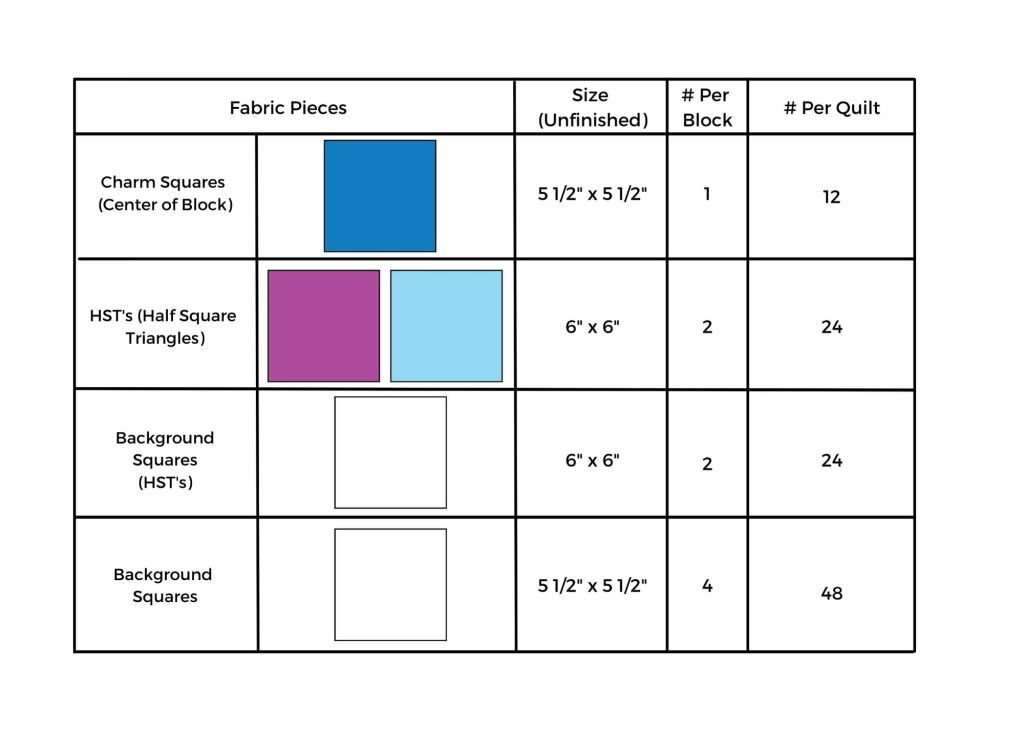
Now that we have the pieces planned for our quilt, let’s move on to creating cutting instructions.

A. Charm Squares: 24 are used as-is for making the HSTs (6” x 6”) and 12 trimmed for the centers of each block (5 ½” x 5 ½”).

B. Minimum background fabric required:

                1. Figure out how many pieces can be cut from a single width of fabric (WOF) strip for each of the fabric pieces:

Dividing 50” (our assumed WOF) by 5 ½” you get 9.09 so round down to 9. You can get 9 squares 5 ½” x 5 ½” from each 5 ½” x WOF strip.
Dividing 50” by 6” you get 8.333 so round down to 8. You can get 8 squares 6” x 6” from each 6” x WOF strip.

                2. Divide the number of fabric pieces needed by the number of pieces you can get per strip to figure out how many strips are required.

Our example pattern requires 48 background squares (5 ½” x 5 ½”) and you can get 9 squares per strip so 48/9 = 5.333 which rounds out to 5. In this case, to cut 48 squares, you will need 5 strips of 5 ½” x WOF.

Our example pattern also requires 24 squares for the HSTs (6” x 6”) and you can get 8 squares per strip so 24/8 = 3. To cut 24 squares (6” x 6”), you will need 3 strips of 6” x WOF.

Step 2: Let’s Add a Border!

A finished quilt looks great with a border! Let’s go over how to figure out the strips you’ll need for the border.

Here’s how to figure out your yardage for the side borders:

# of blocks x-height of blocks (unfinished) – ½ times [# of blocks -1]

To create the top and bottom borders, use this equation:

Quilt top width + side border thickness + the side border thickness – 1″ (for seam allowances).

Step 3: Find The Yardage For The Quilt Top

To calculate the yardage of background fabric needed, multiply the number of strips times the thickness of the strips for all of the strip sizes you use.

Step 4: Include Binding Fabric Measurements

Calculate the binding fabric (for a straight grain), by adding up the lengths of the 4 sides and adding 10″ of safe space before dividing by the width of fabric.

Step 5: Don’t forget the Backing!

This is a simple measurement; we recommend adding an 8″ overhang, 4″ on each side, to your quilt top width. This is basic for all quilts and what’s usually required by quilters. The best thing to keep in mind is that programs available on your phone and computer can assist with calculating these measurements. For example, Robert Kaufman has a free mobile app to calculate borders, binding, backing, and more.

Let’s Create Our Pattern Sheet

Once you’ve finalized the sizing needed and the designs you’ll create, we can begin putting together a physical pattern. There are programs available to quilters that can help you create patterns. Whether you choose to use programs you might already have, like Microsoft, or invest in higher-tech ones like EQ7 or EQ8, we broke down a few you can look into.

Design and Pattern Layout Programs

Microsoft PowerPoint: This program can be found in most electronics and is universally used. It’s great for the basics when starting off and is very user-friendly. The only setbacks are aligning blocks can be complex, and vector images aren’t accepted.

Electric Quilt (EQ8): This is an excellent program for editing quilts, and it allows you to break down quilt designs so that you can export portions at a time. However, it is challenging to create HST’s and can result in low-quality images in the export process.

Adobe Illustrator: This program is perfect for those that enjoy advanced artwork. You can create vector images and obtain high-resolution photos, and there’s an extensive resource library available for any learning curve. The cons of this program is that it does come with a fee of around $20 per month.

Adobe Indesign: This program is best for pattern layouts and offers the most professional quality. Like Illustrator, it does come with a monthly fee and learning curve.

Corel Draw: Perfect pattern designing and layouts, Corel Draw allows you to create art, export in vector files for high-quality images, and hit a lower cost point.

Images and Graphics to Include

Illustrations:

  1. Cutting: if you have an efficient way to cut, include how in the instructions
  2. Block Piecing: The majority of your illustrations will show the pieces assembled together. We recommend starting from the finished block and breaking down from there.
  3. Quilt Top Assembly: Showcase how the blocks go together into the quilt top.
  4. Optional: Include how the backing is pieced, bonus tips, and templates.

Text:

  1. Introduction/notes: Describe the pattern, inspiration mentions, and more.
  2. Material requirements: List all material requirements, including sizing.
  3. Cutting: Include the calculations and measurements needed for cutting.
  4. Block assembly: Walkthrough creating the blocks and assembling the quilt.
  5. Quilt top assembly: Walk through the instructions of piecing the blocks together and assembling the quilt.
  6. Finishing: Walk through the backing, binding, batting, and more instructions.

When you’ve completed creating a pattern, creating a PDF file is the last step. This file format is the most commonly sold in pattern networks and is the easiest to access across platforms.
Get To Testing!

Lastly, before selling your pattern creations, it’s time to go through some trial testing. Share this pattern with trusted friends and family members who can review your work and provide feedback. Request that they confirm the measurements were correct, that the pattern was readable and that they’re able to follow, and more. Use this as an opportunity to spruce up your creation for potential buyers. Then, build the pattern yourself and see what could be added or removed in your work.

Time to Publish!

Once you’ve triple-checked your pattern and decided it’s time to publish, take time to determine how you’re going to sell and where. Digital PDFs are the easiest to share and sell online, and printed patterns can be sold at markets, shows/events, and local quilt shops. Look into E-shops like Etsy and Craftsy when starting off your online shop, and if you choose to go physical, contact your local artisan markets and quilt shops for possible sale opportunities.


JUKI Small Business Seminar: How to Write a Marketing Plan 

When it’s time to get your business out there, it’s essential to start building a marketing plan. Think of your marketing plan as a road map to help you reach those target audiences. Items like consumer trends, product sales and demand, and more can be studied through marketing trends, helping you create a more accurate business plan.

Why should you focus on marketing? The simple answer is that marketing is how customers find your business. Whether you choose to do this online or in-person, following through on marketing plans can upgrade your shop’s sales and popularity. Follow along as we go over some essential things to keep in mind once you begin creating your marketing plan.  

Executive Summary

The first page will cover your executive summary when you begin your marketing plan. Here you’ll be summarizing the marketing strategy you hope to follow. Your executive summary will include the following points.

  1. Business Details: confirm your business name and where you will be selling to the customer. This can be through e-commerce, word of mouth, storefront, etc.
  2. What products and services you’ll be marketing: confirm the products and services your company will focus on. From here, make sure to note what advantages your products/services have over the competitors and which you think will be customer favorites.
  3. Mission statement: this statement will become the forefront for your shop in many ways. Make sure to think of a one-sentence statement that embodies what your shop represents. For example, the Coca-Cola Company is “Refresh the world. Make a difference.”
  4. Marketing goals: make sure to create short and long-term marketing goals. These goals can relate to growth in your return on investment (ROI), obtaining new customers, and raising retention.
  5. Create a budget and Projections: Focus on what your Return on Investment (ROI) will be once you push your marketing plan forward. You can adequately plan for paid advertising and marketing spending by learning your estimated ROI.

Creating your executive summary will be last on your to-do list since this will embody your complete plan as a whole.

Market Research

Your first step in creating a marketing plan is conducting market research for your industry. Try to avoid assuming or overconfidence bias when creating your marketing plan, as this can lead to lower revenue than you’re expecting and cause a mishap in your financial planning.

Look into market research for your audience base. Review website analytics, social media audiences, and customer surveys to get an idea of what attracts the customers you’re aiming for and see what you can bring to the table that competitors might be lacking.

Review their demographics (location, age, and income level) to better focus your marketing efforts on markets that want your product. For example, if you focus your efforts on an audience that is too old for your product or can’t afford it, you could be wasting your efforts, resulting in low ROI levels for your business. Remember that your marketing audience can be different from your product audience. For example, while you’re creating children’s apparel, it’s the parents and adults in their life you’re marketing to.

Finding Your Strategy 

Choosing a strategy for your marketing is focused on three items: what channels you’ll be on, how you’ll format, and what your messages are.

What’s Your Channel?

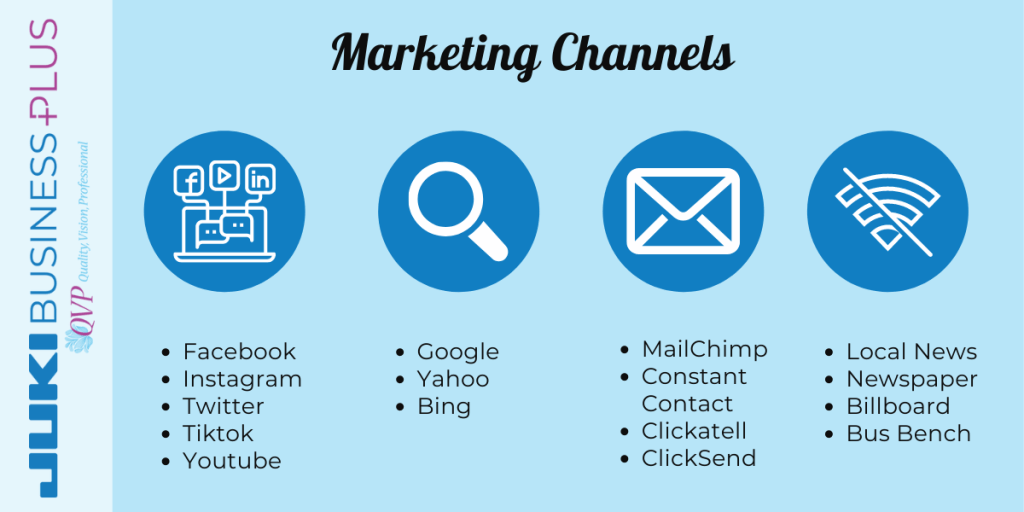
These are the platforms you’ll find yourself using to promote your business, products, and services. By reviewing your target market research, you can see which best channel options are for you based on what channels your target audience can be found on. For example, if your target audience is a younger crowd, you might find yourself promoting on Tiktok or Instagram, as compared to using Facebook.

Channels to Focus On:

  • Social Media: Used by over 50% of the population, social media marketing is a top platform for your business. You can post for free and reach your target audience by researching sites like Facebook, Instagram, Twitter, Pinterest, and more. These sites are also a perfect platform to keep in contact with customers and build a relationship with shoppers.
  • Search Engines: When consumers need something, they’ll usually run to their favorite search engine. Keep this in mind when choosing where to place ads and how to create the content for your website, as search engines work off SEO (Search Engine Optimization) and follow the content you have on your site. Do this to hit your target audience when they’re looking for your product on the internet.
  • Email Marketing and SMS: Think of this as your direct line to your customers and those interested in your product. By using these resources, you can inform customers of deals, products, and more directly to their inbox.
  • Getting Offline: Marketing is not contingent on the online world. Look into channels like radio shows, billboards, TV campaigns, and more.

Once you’ve figured out what channels you’re going to market on, plan how you choose to do so. You can choose to go for organic marketing, which would mean no money involved, only your time and effort. Or, you can choose to advertise on these channels and pay for a boost on your posts. Paying for advertisements can get your product out to new crowds that usually wouldn’t see your post and can be directed to whom you choose in many cases.

Don’t stretch yourself thin with how many channels you focus on. Going too wide can be difficult to maintain and properly focus on, losing your audience in the process instead of creating a bridge between you and them. Instead, focus on your top channels, and put your effort into where your audience base can be found on. Remember that having only one channel will not assist you in the long run either, so it’s good to find your happy medium and work on those.

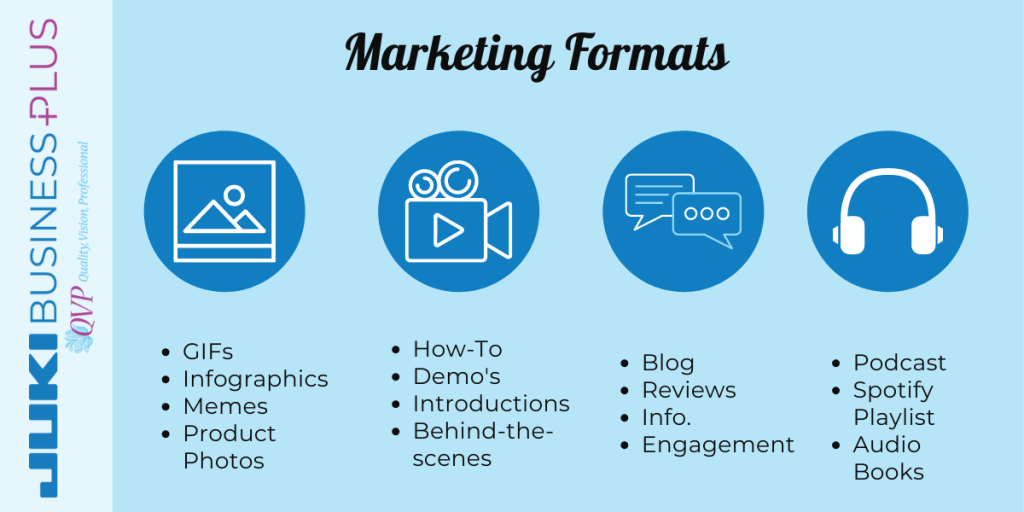
Formats to Use:

When you choose to post and advertise, think about what formats your audience would pay the most attention to.

  • Images: This can be GIFs, infographics, memes, product photos, and more.
  • Video: Use YouTube, Instagram, or TikTok to your advantage. Highlight reels, demonstrations of products, and how to use them, bring in the audiences, and create a more personal feel to your channels. This can also include introduction videos to your company, team members, and you.
  • Written Content: As we mentioned, search engines will find you through your SEO. One of the best ways to accomplish this is to create blogs and posts that will bring search engines to our sites and social channels. When creating content, focus on blogs, your website landing pages, and transcripts for videos.
  • Audio: Podcasts and Radio shows are popular forms of channels for travelers, active and sports enthusiasts, and hobbyists who enjoy listening to these forms of channels, like Spotify and the podcast app, during their activities or traffic.

When you’re marketing, you need constant content. Social media has created a world where consumers want new and fresh posts to focus on and bring their attention in. This can be demanding for a small business to keep up with, which is why we recommend researching tools that can assist with posting and scheduling like Hootsuite or Sprout Social.

Try and bring your audience in by encouraging posts with tags and hashtags to your company page. This gives you new content to re-post and helps you market your products and services in a no-cost way through your past customers. You can also partner with social media influencers who relate to your product or service, assisting you to gain brand awareness with little work on your end.

The Message 

When you’re working on different channels, this doesn’t mean your message changes. Remember to keep all your post across channels consistent in what you sell, the services you offer, and everything else. You want to keep consistency to grow trust in your business.

Find your message, and use it as a catalyst for what your content centers on. For example, Walmart’s channels will always focus on them being the lowest price, no matter what content they’re producing. Finding your adjective, the comfiest, the lowest, the highest, will set a tone to what you create going forward and how you’ll center your advertising. If you’re unsure what your message is, take a moment to reevaluate your business goal and why you want people to buy from you.

In your messages, try to avoid focusing on product features and focus more on what the product can do for the consumer. For example, if you’re creating blankets, knowing the size is great, but creating a story about having the comfiest blankets perfect for a night’s sleep will grab customers’ attention more. Marketing is about the product, yes, but it is also about building that relationship with your customers and wanting them to care about your product.

Budgeting

The best thing about marketing is the option to be high or low on your budget and still do well. Marketing can be done organically and paid, allowing you to choose where your budget should go and where you can cut and still do well.

Free marketing is out there! Many social media sites do not require paying to have a page or profile. On sites like Instagram and Facebook, creating profiles and pages is free of charge and allows you the freedom to get your name out there using hashtags, geolocations, re-share buttons, and tagging. Don’t forget many of these sites also allow you to invite your peers to share and like your page, helping you get your name out there.

You can also submit your business in marketing competitions like press opportunities, awards, podcast and blog features, and so much more. Using word of mouth through these submissions allows your company to save on marketing spending while assisting your goals.

While your budget for advertising spending may be low, remember to account for the time and effort that goes into the marketing itself. From creating the content to scheduling and posting, make sure to account your salary, or workers’ salary, into your marketing budget.

What’s your goal?

Lastly, take the time to break down your marketing plan goals and how you plan to measure the success. One of the main ways is through ROI (Return on Investment), the revenue you plan to obtain after spending your budget on the marketing.

Plan your marketing budget around your expected ROI to avoid situations where your marketing has a higher price than what you’re getting back on it. For example, if you see that a marketing campaign has begun to cost more than what you’re selling of the product, plan to revise that campaign and place your funds in a different project that can better assist you.

Besides the money, you can receive from marketing, think about other goals these campaigns can accomplish for you. It’s not always the dollar price in sales we’re concerned about, but rather brand awareness, website traffic, and followers. If you can create a marketing plan that can hit your goals, whether it be a dollar sign or follower count, you’ll be able to see a higher success rate down the line.

From Planning to Marketing 

Once you take that step and implement your marketing plans, you’ll finally be able to see your idea at work. You are spending that time to create your marketing plan, whether its hours or days, which will help you, in the long run, create a business with better sustainability and higher exposure.

Knowing your audience, where they are, and how to communicate with them will bring you that step closer to closing a sale each time.

  1. Know your market.
  2. Know your channels.
  3. Know your message.
  4. Know your budget.
  5. Know your goal.

When you keep up with these five points, you’ll be able to see what your marketing is doing for you and how to elevate your company when the time comes. So keep up with your marketing and know about its unpredictability and how it can bring awareness to your company. Marketing can bring your business to new heights and is an important plan to keep nearby!

5 Projects You Can Create on Your Embroidery Machine

When you own an embroidery machine, you can accessorize, personalize and decorate just about anything you can get your hands on. So whether it’s the denim jacket you’ve wanted to revamp or personalize your quilt, embroidery is another form of design taken to the next level!

While embroidery machines are not new to the home sewing world, their technology advancement has passed bounds for those who want to start a small business. Starting your small business is easier than ever with the ability to find top-speed and high-quality machines for home use now. Now that the machine is in your grasp, what can you start creating to sell for your small business?

Follow along below for 5 ideas you can bring into your small business that is fun and easy to complete.

Bags and Purses

Perfect for any season, everyone uses some form of carrier. Whether it’s a tote bag for groceries, a beach bag for toys, or a purse for going out, there are so many options when it comes to personalizing bags! You can place fun sayings, eccentric artwork, or beautiful designs and create a new and fun product for bag lovers.

Monogrammed products

Never out of style, people love owning and gifting monogrammed pieces! Newlywed couples, or those celebrating an anniversary, can enjoy gifts like monogrammed robes, towels, and more. Sports enthusiasts can enjoy having monogrammed sweaters with their favorite teams to cheer on at the games. Readers can find comfort in monogrammed blankets for nooks! The possibilities on who can enjoy this are endless, being a perfect niche to jump into.

Embroidered Pillows

Embroidered pillows from a small shop are an excellent idea for those who love to spruce up their home with fun and exciting décor pieces! Different from those in stores, think of how your designs can bring personalization into buyers’ homes, letting them share their passions in colors, designs, and more. 

Baseball Caps & Other Apparel

Whether you’re creating hats to support sports teams, your city, or your brand, baseball caps are favorites for many. Think of designing pieces with local area code numbers, fun sayings, silly designs, and more so others can show off their personality with your work! A classic go-to, baseball caps are always in style and can be worn by everyone. T-shirts, sweaters, and other apparel pieces are always popular, a classic to create and work on! Allow your creativity to flow as you create pieces with original designs, fun and sassy quotes, and more. Look into different types of clothing like jean jackets, uniform shirts, and more to get a better idea of what you want to create.

Pet Accessories

Pets are like family, so it’s no secret why creating for pets is a fun niche to jump into! Create pieces like pet beds, clothing, food mats and so much more for those furry friends. Simply embroidering pet names can be a big selling point for those who want personalized pieces, and a way to express their style in their homes. Not sure what to create? Check out our business page here for ideas!

What Will You Create?

There are so many things you can customize and create with your embroidery machine. From pieces, we talked about to other exciting ideas like jewelry, ornaments, and more, the possibility of what you can create is up to you! So keep up with JUKI as we share our project ideas through the year that you can create on an embroidery machine and others. What project would you be most excited to create on an embroidery machine?

5 Reasons to get a JUKI Tajima Sai, Embroidery Machine

Thinking of starting an embroidery business? Trying to decide on a suitable machine? Then, follow along as we go over the top 5 reasons you should consider the Tajima Sai, JUKI’s 8-needle embroidery machine!

A hobby that is forever growing in popularity, it’s no wonder many creators are beginning to open their small embroidery businesses. With the ability to personalize, design, and create unique pieces, purchasing the proper embroidery machine for your small business is the first step to success. Before you take this initial step, here are some things to keep in mind when looking at our Tajima Sai embroidery machine.

Fast Production and Speed

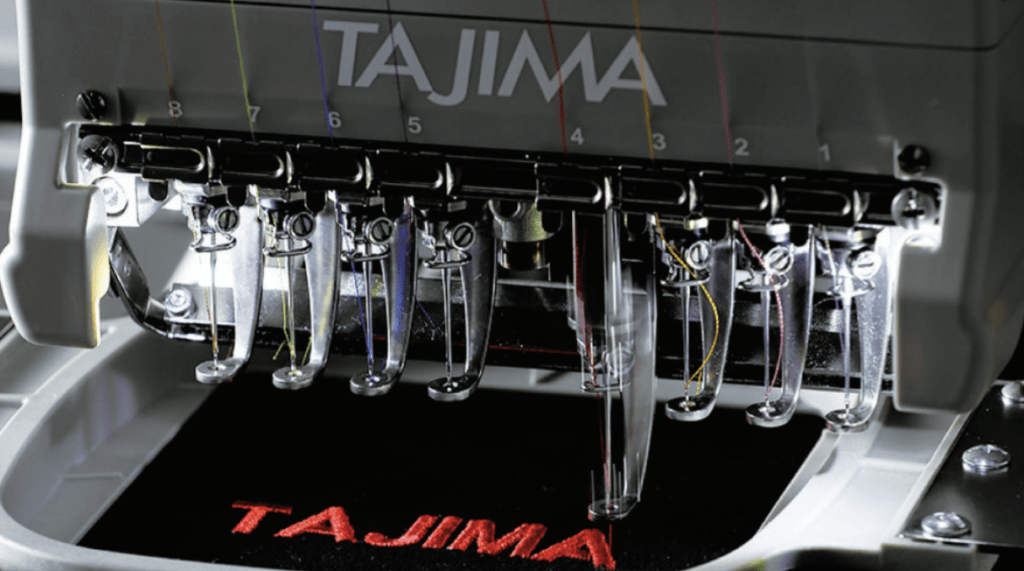
Finding a suitable embroidery machine means looking into key features that are going to elevate your small business. One of the top things to keep an eye out for is the speed and efficiency a machine can offer. When your business picks up, and you need to push out many products, think about how fast your machine can create. While many machines can offer 1,000 stitches per minute, steps in between the stitching, like cutting and knotting, can slow that process down on other machines. The Tajima Sai, on the other hand, uses a system that doesn’t slow down, and in fact, keeps its momentum through the stitching process. Because of this, the Tajima Sai can, at times, finish a project faster.

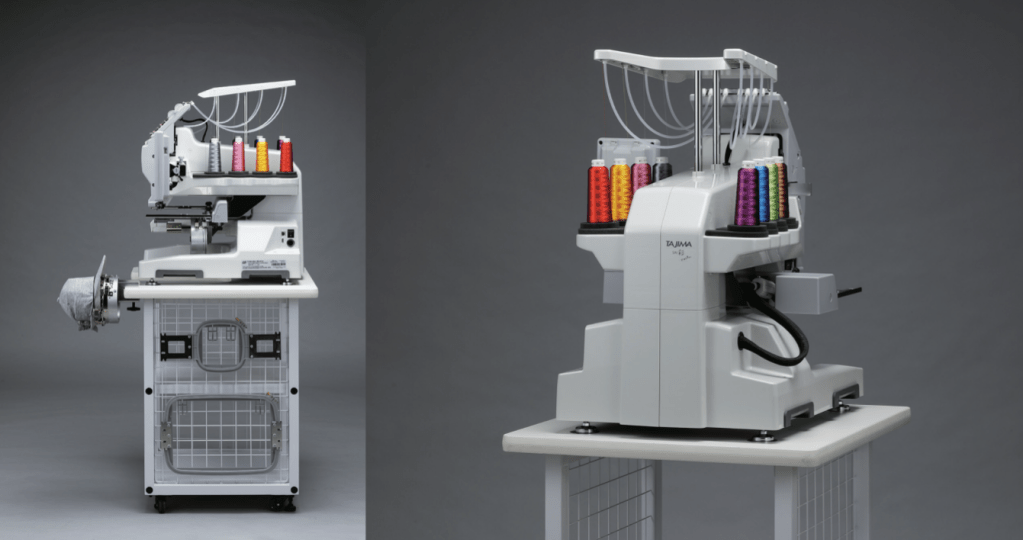
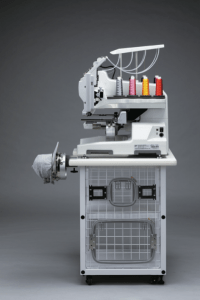
As for production, think of what projects you’ll create and what accessories you’ll need. Many embroidery machine users will work on pieces like apparel, for example. The Tajima Sai machine offers 2 sets of accessories like our 200mm x 300mm frames, 100mm x 100mm frames, and cap frames. Having two sets allows you to set up the following product while one is being embroidered. Using these pieces, you can create customized sweaters, t-shirts, kitchen towels, and more.

You also have the advantage of 8 thread options on your machine at all times, making it easy to create beautiful multi-color designs with few thread changes. Inheriting the high-performance ability of industrial embroidery machines, it offers fine lines and wide areas that can be embroidered. It also provides a large laser pointing system, lining up your start point and tracing your design more effortless than ever, taking out the guesswork before you stitch.

Cost-Effective

When starting your business, it’s best to create a budget and focus on small investments before moving into a significant production mindset. However, the embroidery business doesn’t require a huge budget to get into. The Tajima Sai, for example, can be found for USD 14,999.00 (MSRP) and includes its easy-to-use software, frames, and/or other options depending on the package and vendor you purchase from.

Easy-to-Use Software

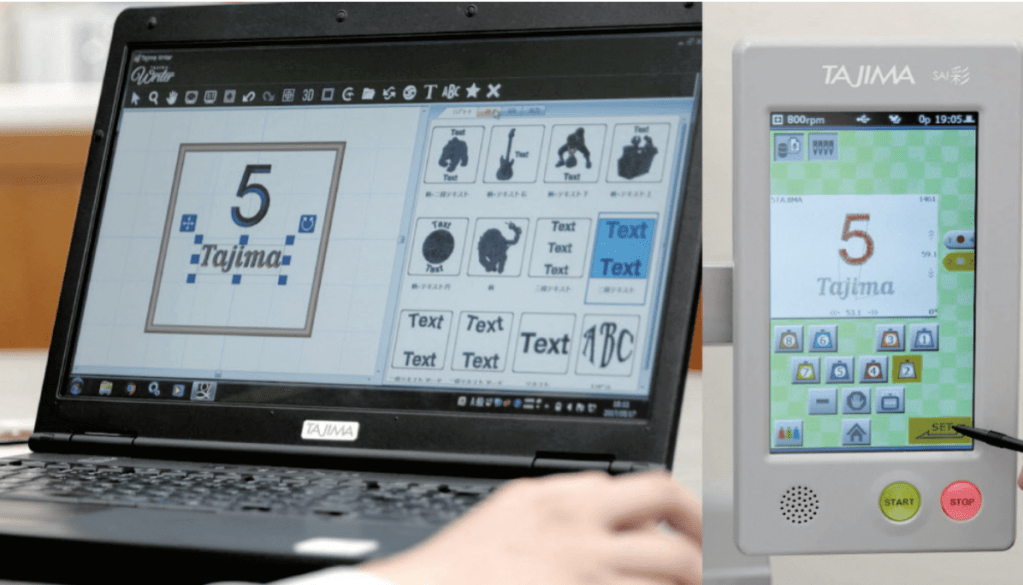
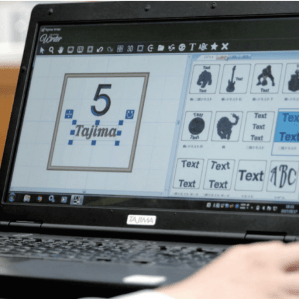
When choosing an embroidery machine, you can choose one that comes with software or is separated. Remember that selecting the machine with software included can save you money in the long run since programs can run from $600 – $1,000 depending on the machine’s brand and type. The Tajima Sai includes its program, the Tajima Writer Plus, a digitizer software for Windows with built-in design templates.

Having software included can also help you save on spending for designs and fonts since the Tajima Sai has integrated fonts and designs for your use right out of the box, allowing you to start working on your business the second you receive the machine. It offers more than 200 designs and 31 fonts pre-installed with an additional 1,000 embroidery designs by Pulse. 

Space-Saving Design

Think of location when you’re going to open a shop, whether online or in person. If you’re starting your business from a small space in your home, a machine like the Tajima Sai could be a perfect fit. Compact sized and only 82 pounds, this machine is not only able to fit in small corners but can be used for on-location sales like your local markets or inside smaller brick and mortar shops.

Endless Possibilities 

There are a limitless amount of projects you can create with an embroidery machine at your disposals, such as embroidered table cloth, t-shirts and sweaters, baby towels and gloves, embroidered memoirs, and more. Like any other small business, you only need to decide what your niche and products will be.

Starting a small business is exciting! Think of what embroidered products you enjoy purchasing or that you’ve thought of enhancing with some personalization. The wonderful thing about owning your small business is the endless possibilities of projects at your disposal and the ability to try and test new ideas.

With the Tajima Sai, you can create many projects, but some top ones we recommend are embroidered t-shirts, sweaters, home décor, hats, and socks. Designs can be used straight from your Tajima Software or downloaded by you to showcase the creations you’ve designed yourself.

When it comes time to buy your embroidery machine, remember to keep these things in mind:

  1. What’s the production and speed like?
  2. What’s the cost?
  3. Does it include software, and what resources are available to learn the program?
  4. Where will the machine be placed, and will I need to travel with it?
  5. What accessories are available for the machine, and what can I create on it?

Make Your Embroidery Business a Success with the Right Equipment!

While the embroidery business continues to grow, there will always be a need for personalized and unique products. Your small business can bring a new and fun product into the fold, which is why you must be readily prepared and have the right equipment on hand. Remember, your machine is the base for your business, so make sure you research and choose the right one for you!

How to Start Your Embroidery Business         

A hobby where the community is ever-growing, embroidery is forever growing in popularity around the world. Due to this, it’s no surprise so many have begun their own business in embroidery projects ranging from fashion to accessories to home décor. Thankfully it’s never been easier to set up your own embroidery business! So whether you’re starting from a corner in your room or a more extensive scale location, we’re here to explore things you need to know before starting.

What Skills Will I Need?

Before starting any business, it’s essential to understand what skills you need to know first. If you don’t know a skill, that doesn’t mean you can’t start a business; it only means it’s time to pick up a new skill! Don’t forget that you can also reach out to friends and family you want to work with who already have those skills you need.

Machine Operation:

Handling an embroidery machine is exciting, and while it comes with a small learning hill, once these machines are set up, they’re an exciting new thing to use! An embroidery machine like the Tajima Sai is perfect for businesses and hobbyists who want to upgrade. Its software, Tajima Writers Plus, converts text to embroidery data or creates embroidery data by combining registered designs and text. It’s easy to switch thread color, set embroidery positions, make adjustments, and more using its digital screen, helping new users handle the machine easier.

Design Software and Creating Art:

When opening up an embroidery business, the vital thing to keep in mind is that you don’t need to be artistic, just creative! Like the Tajima Sai, some machines come installed with their Writer Plus Software used for digitizing, editing, and font software and are accessible on its LED screen. Finding a machine with built-in software is one the best ways to start an embroidery business, as this will keep you from having to purchase another part for your machine separately.

When it comes to creating artwork, you need your PC and machine. For example, computerized embroidery machines require vector images. This can be accomplished through software like Adobe Illustrator. By designing art on Adobe Illustrator, a popular application with many guides and how-to-use references on the internet, you can create your artwork. Once it comes to downloading these new artworks onto the machine, it’s dependent on what form of software you have.

An Illustrator Embroidery Plugin is plugin software that converts a vector image into an embroidery pattern. You can also choose Embroidery Software, such as Tajima Sai Writer Plus Software, which can import your Adobe Illustrator vector image and transform it into a pattern used by an embroidery machine. Keep in mind that these programs are likely to work on the machine they’re created for and not others in choosing Embroidery Software.

What Equipment Will I Need?

The Machine: 

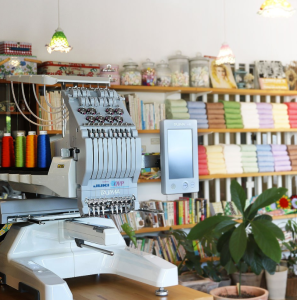
While this will depend on the size of your business looking to set up, you’re going to need to start with one machine. There are many different options on the market, and this will be your most valuable asset. When choosing a suitable machine it should be able to keep up with productivity (think of machine speed and consistency) and easy to operate. The Tajima Sai, for example, was created with small businesses in mind. This means it’s compact, easy to use for beginners, comes with the programs you need, and includes the accessories you need for embroidery. Finding the right package when purchasing a machine can also save money in the long run, as this will keep you from needing to buy accessories or extra programs at a later date.

Embroidery Merchandise:

There are two options you can follow when starting your business, made to order or order to be made. The concept behind these is that you can choose to have constant inventory or keep a list and only create when an order is placed. While these two things can be changed, it’s best to always have stock of items you’re going to embroider on ready to be used.

Some popular items we recommend are:

  • T-shirts
  • Polo Shirts
  • Home Décor
  • Handbags
  • Sweaters
  • Caps

When you start choosing items for your shop, think of who you’re selling to and focus on what type of items customers in your niche are purchasing embroidered.

How Do I Market My Business?

The first thing to do when marketing your new small business is to determine what your goals are. What do you want to achieve? Is it a revenue goal or a profit goal? How many sales per month do you need to generate that revenue? Having a clear idea of what success is to you will help you to define a budget.

Website:

The first thing we recommend having is a shop base like a website or Etsy shop. Think of this as the public face for your online or at-home business. Here you’ll be able to share your company message, introduce yourself to buyers, and showcase your products and services in a way that’s unique to your brand. Keep in mind ‘Key Words’ (In terms of Search Engine Optimization, better known as SEO, they’re the words and phrases that searchers enter into search engines, also called “search queries.”) Using the right keywords on your website for your product will help you show up in higher ranking on search engines.

Advertising:

Once you have your budget think of where your audience is based. Free marketing you can start with is creating social media accounts that you’re audience uses. For example, if your audience is between the ages of 30-55, you’ll have a high chance of finding sales on Facebook. If your audience is mothers, you can post on Pinterest and Instagram. Ways to be found on social media rely on hashtags, geo-location (when you tag a city or spot), and getting others to put your name out there.

Paid advertising differs, but it’s still important to keep in mind what websites and google searches your audience is doing to promote correctly. Startup businesses can look into programs like Google ads, Yahoo Ads, and paid Facebook and Instagram Ads.  

Opening up Shop

Once you have your machine, products, and website up, it’s time to start putting yourself out there! Take advantage of social media sites and use these as a platform to reach and interact with your audiences. So many people enjoy finding new items to buy on their social pages, and getting yourself on there is a great way to reach customers.

There’s a reason why embroidery businesses do well. Whether it’s the fun in personalization that’s available, or the opportunity to purchase from a small business something unique and in their interest, the market is always welcoming new ideas. To keep your company successful, focus on what you can control and make sure you choose the right equipment and programs. With these being the foundation to a long-lasting business, it’s essential to choose suitable materials.

We hope this helps give a glimpse into the beginning of opening your own embroidery business! Visit here to check out JUKI’s Tajima Sai embroidery machine to learn more about its Writer plus Software, the machine’s speed, features, and more!